File and video hosting for Webflow. A client request I built in two weeks, which now serves more than 70 million requests a month for teams at ElevenLabs, Chili Piper and Lindy.
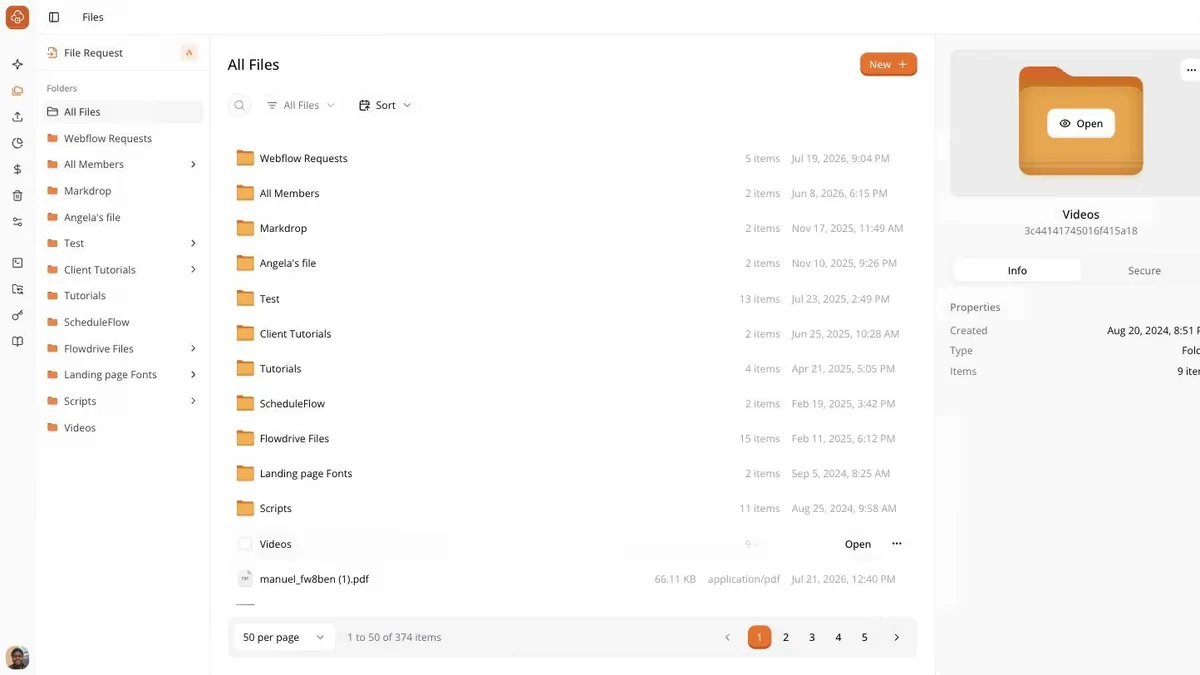
The library. Files, folders, and one panel — the whole product surface a customer touches day to day.
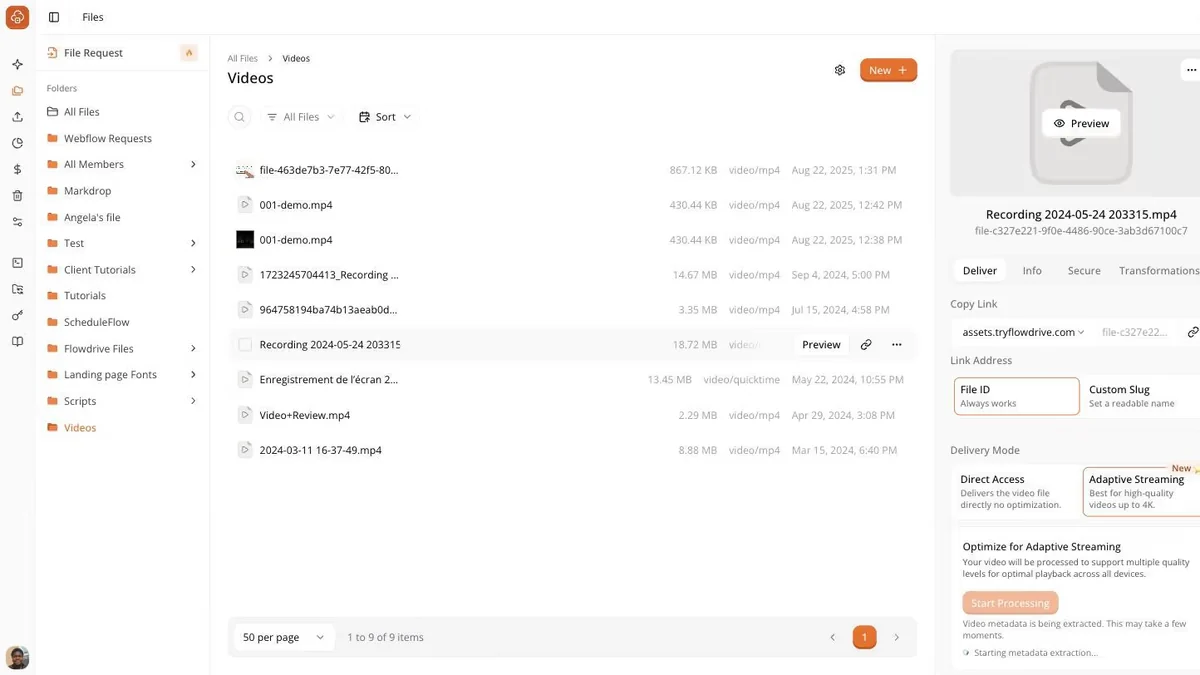
The panel that carries the entire product thesis: a file's job is to hand you a URL you can use immediately.
The problem
A file that works everywhere except Safari
A Webflow developer builds audio testimonials for a client. Webflow will not host an mp3, so he
uses the workaround the community had settled on: rename the mp3 to .txt, upload that, point a player at it. Webflow accepts
it. It plays. He ships and invoices.
Then the client opens the site in Safari and hears nothing.
“You can save a .txt file natively inside of Webflow and it works perfectly — but it doesn't work on Safari.”
The workaround is not missing. It exists, it is widely shared, and it fails silently in one
browser after the invoice has gone out. The cost is not effort — it is the developer's
credibility with their client.
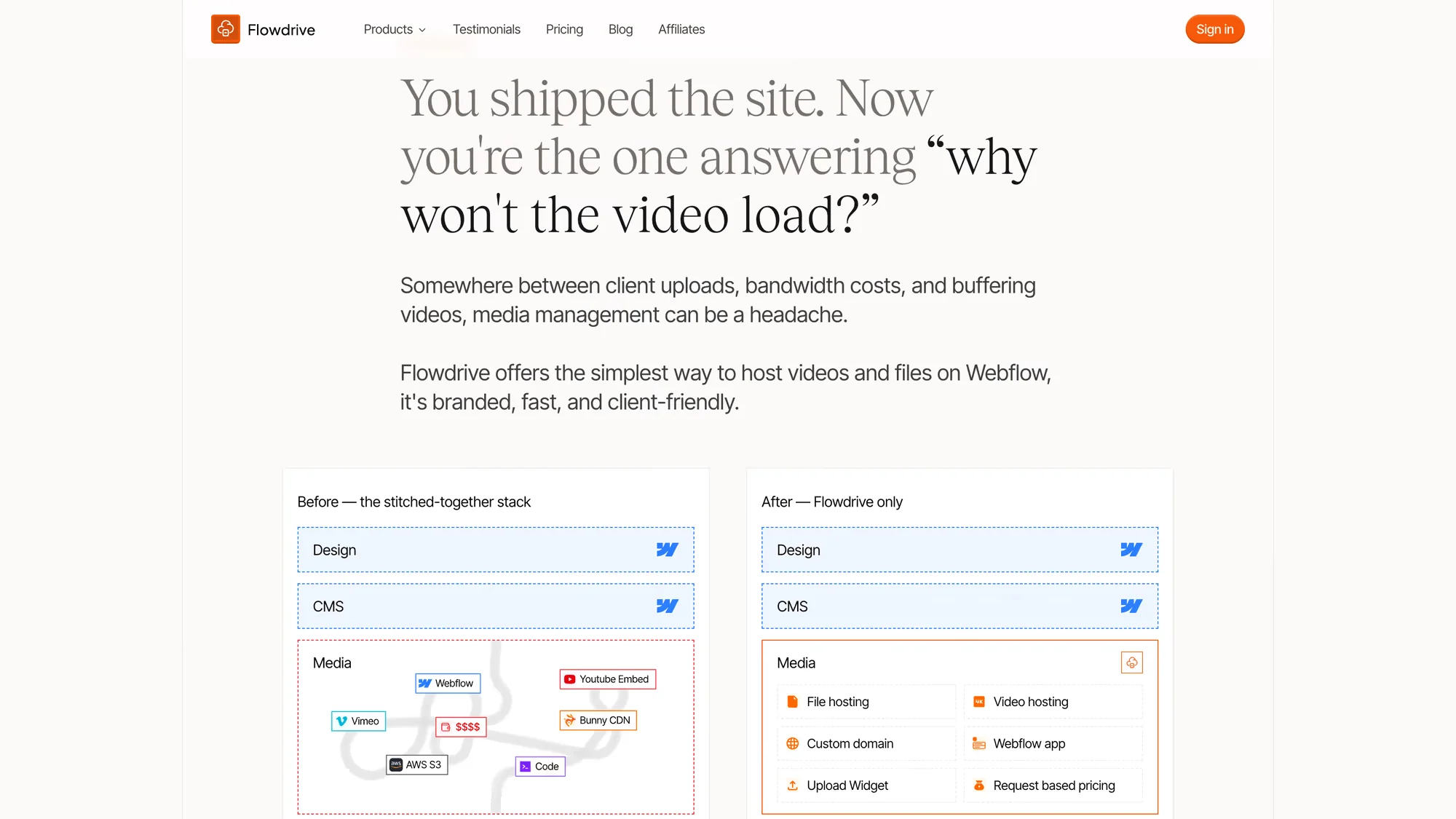
How I frame the problem on the marketing site. The headline is the sentence I heard in interviews almost verbatim — the developer who built the site is the one who has to answer for the video.
Left: what teams were actually running — Webflow plus a YouTube embed plus Vimeo plus Bunny CDN plus S3 plus code holding it together.
Right: the same row collapsed into one column. The pitch is subtraction, not features.
Design and CMS are identical on both sides. Only the media row changes, because that is the only row I have any business touching.
Why the gap exists
A constraint, not a bug
Webflow caps uploads at 30MB, restricts which types you can upload at all, and has no native
audio or video hosting. Background video carries no audio. A CMS video field takes a YouTube or
Vimeo link, not a file.
Before building I wanted to know whether this gap would close on its own. My read was that it
would not: storage and bandwidth are a direct cost to Webflow, and file hosting loses the
prioritisation argument every quarter because it does not drive their revenue.
That is the reframing that made this worth building. A missing feature ships eventually and
your product evaporates. A structural constraint stays
open — the same opening Finsweet, Flowbase and Slater were each built into.
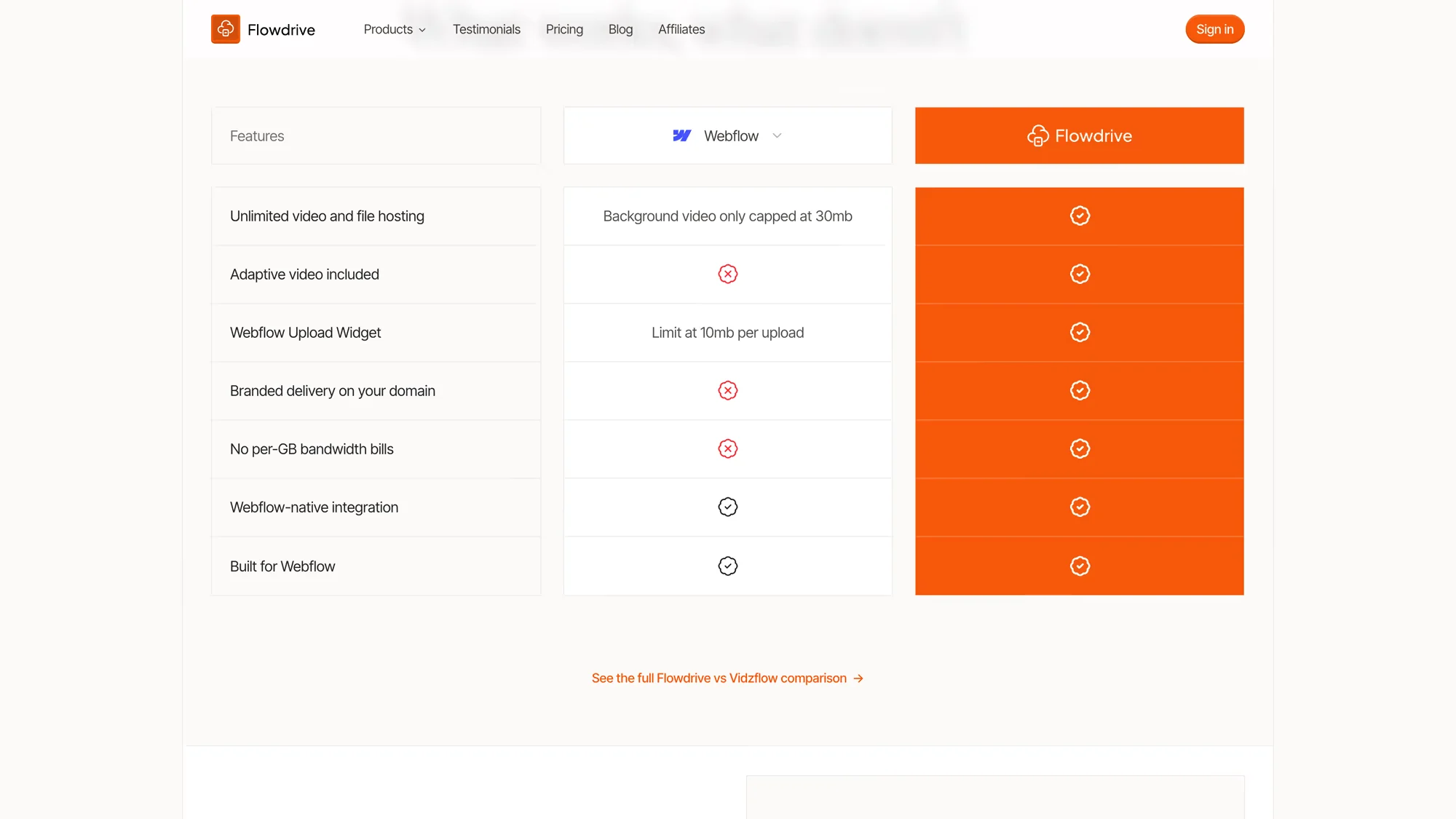
The comparison table exists to make the constraint checkable rather than asserted. A prospect can verify every row in the Webflow column themselves in about a minute.
The two numbers in the Webflow column — background video capped at 30mb, uploads limited to 10mb — are the whole reason the product exists.
Rows are ordered by how often the limit came up in interviews, not by how impressive the feature is.
Research
The failure that taught me to ask properly
Early in my career I was the only designer on a team building a community product. I believed
design was UI. My research was a competitor scan and tests built on questions like would you use this? Everyone said yes. We shipped to the App Store. Nobody used it.
The runway ran out and I was let go, phrased as a pause rather than a layoff.
“We are currently experiencing financial difficulties at this moment — you can go, and then we'll call you back. And it's been more than four years.”
I had read those yeses as validation. They were politeness. A question that contains its own
answer collects agreement, not information.
What I did next matters more. I opened my following role by naming that failure and asking for
a research budget before accepting the work — and got one. That product is still live, with
paying customers and enterprise integrations.
The guide I used for Flowdrive
The rule is the Mom Test: if your mother would say yes to the question, the question is broken.
So every question below is about something that already happened, and the product is never
mentioned until the problem has been described without it.
What I ask
Context
Establish the work without proposing anything.
What is your experience with Webflow?
What kind of work do you do in it, and who for?
Behaviour
A past event has a real answer. A hypothetical has a polite one.
Walk me through the last time you needed to put a video on a Webflow site.
What did you end up doing?
Have you hit a situation where you needed to upload files? Tell me about it.
Widening
The person in front of me is rarely the person whose needs drive the work.
What kind of clients do you work with?
What kind of files do they host?
Consequence
Establishes whether the problem costs anything. Most do not.
What happened after you shipped it?
Did the client notice? What did it cost you?
What are you doing about it today, and what do you pay for it?
What I never ask
Every one of these invites a yes. I asked questions like them once and shipped a product
nobody used.
Would you use a tool that hosts video for Webflow?
Do you like Flowdrive?
Would you recommend this?
Is this a good product?
How much would you pay for this?
Reconstructed in September 2026 from the method described in the recording above. I do not run
surveys for this — a survey is a leading question you cannot follow up on.
The Widening questions are where the product changed.
People were not blocked on uploading — most rarely uploaded anything. They were blocked on video: pushed onto YouTube or Vimeo, wearing someone
else's player, often onto a paid plan to remove it.
“You start realising the problem these customers have is not really upload — it could be videos.”
I set out to build an upload widget. The interviews turned it into a delivery product, and
video is still the majority of what Flowdrive serves.
Did the finding hold?
A finding from a handful of interviews is a hypothesis. What made me trust this one is that
customers kept arriving at it unprompted, in public, describing the same problem in the same
terms — including the detail I would have been least likely to invent, that people actively did
not want to use Vimeo.
Confirms: The problem is video, not upload
“We have lots of videos on www.streamalive.com but we don’t want to embed them using Vimeo because most of them are short and we want them to auto-play on loop. We looked at S3 and Firebase but it’s complicated for non-developers.”
Peter Claridge · StreamAlive
Confirms: Background video specifically
“I already use the platform for a few clients who have background videos on their sites. It’s a game changer considering new bandwidth restrictions.”
Irina Zaman · @irina_zaman
Confirms: Being pushed onto a paid plan
“Go to solution to host files and avoid enterprise plan for clients.”
Abdul Ahad · @abdul_ahad
Confirms: Traffic is what triggers the bill
“We found Flowdrive solves a major issue for enterprise-grade Webflow sites: high traffic and bandwidth usage. Instead of upgrading to an Enterprise plan, use Flowdrive.”
Evgenii Tilipman · Tilipman digital
Confirms: Infrastructure was the wrong answer
“No more AWS headaches, and the one-click asset transfer is a huge plus.”
Christopher David Anderson · @christopherdavidanderson
Published in full at tryflowdrive.com/testimonials. Quoted verbatim; none of these were solicited for this case study.
Two of these did more than confirm the finding. Customers independently reported trying S3 or
AWS and abandoning it as too complicated, which is the conclusion I reached from the other
direction when choosing where to store the bytes. And the pattern Evgenii names — that the
bill arrives precisely because a site is doing well — became the premise of the pricing
decision further down: bandwidth pricing punishes the customers succeeding most.
Iteration
What the first version got wrong
The finding above cost me a rebuild. I had shipped the first version in two weeks, and because
it grew out of a single client request — let my visitors submit files — it was built
around uploading. The interviews said uploading was the smaller job.
I can show that reframe rather than assert it, because the product named the job in its own
headline three times and changed its mind twice.
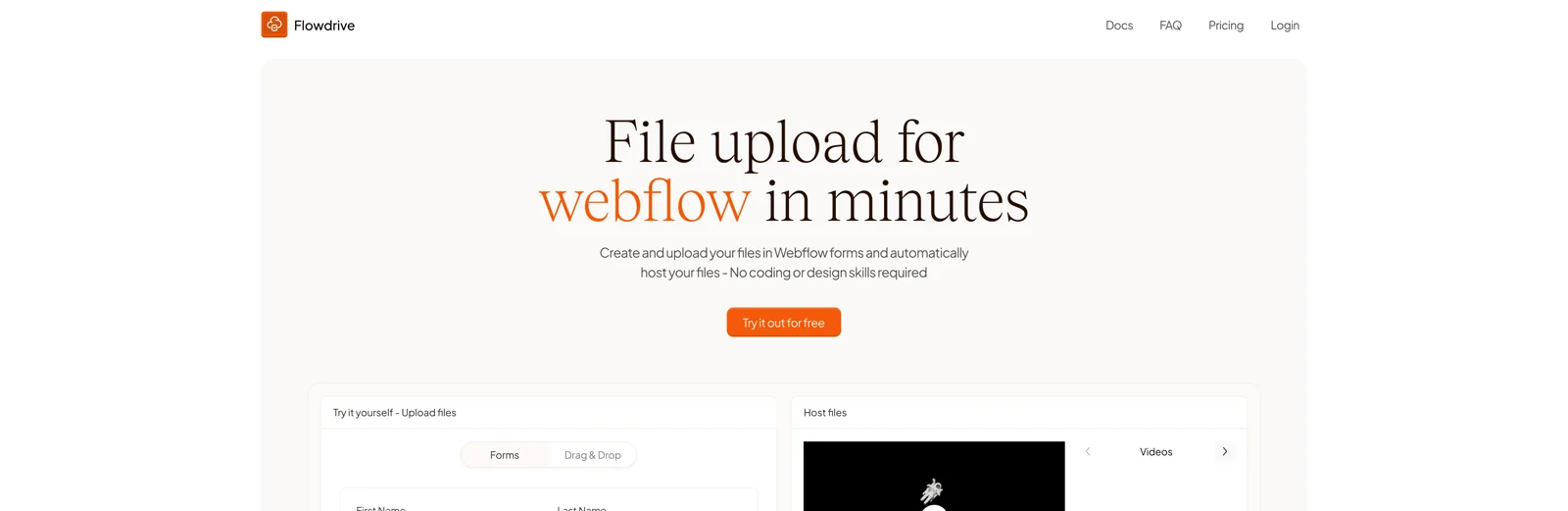
01 · First releaseUpload
Headline: “File upload for webflow in minutes”
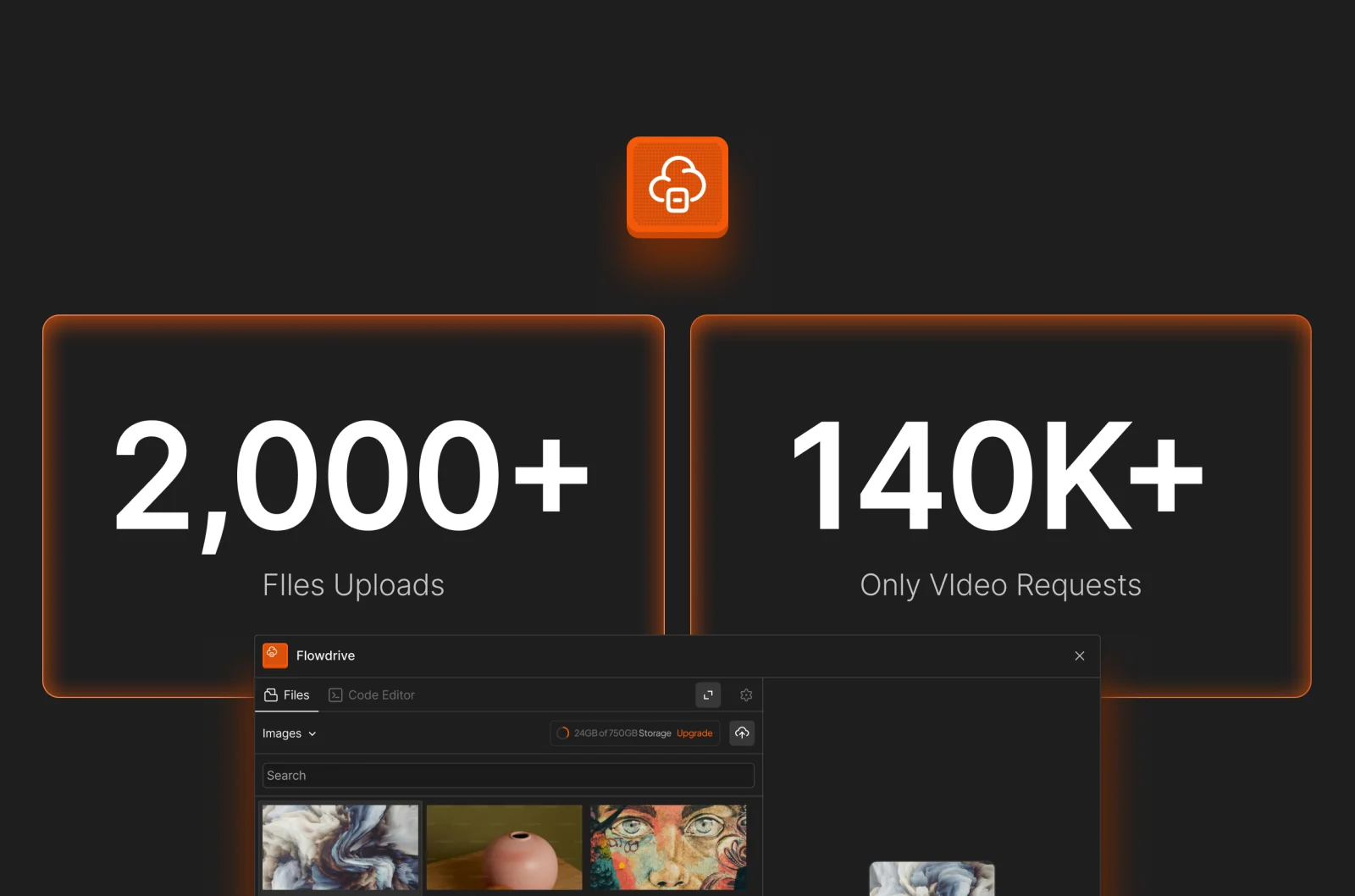
What moved it on: Usage. Uploads were in the thousands while video requests were in the hundreds of thousands. The feature I had led with was not the one being used.
02 · Second framingHosting
Headline: “File hosting for webflow in minutes”
What moved it on: Still too broad. “Hosting” describes what the software does, not the moment someone arrives in trouble — and nobody searches for a hosting layer at 1am.
03 · TodayVideo
Headline: “The easiest way to host videos and files on Webflow”
Video leads and files follow, which is the order the interviews found and the order the traffic
confirmed. The number that settled it was my own:
My own usage data, early on. The feature the first version was named after generated roughly one seventieth of the traffic.
2,000+ uploads — the job the client originally asked for, and the one I built the product around.
140K+ requests, video only — the job nobody had asked me for directly.
Two orders of magnitude is not a preference signal. It is a different product.
What the first app got wrong
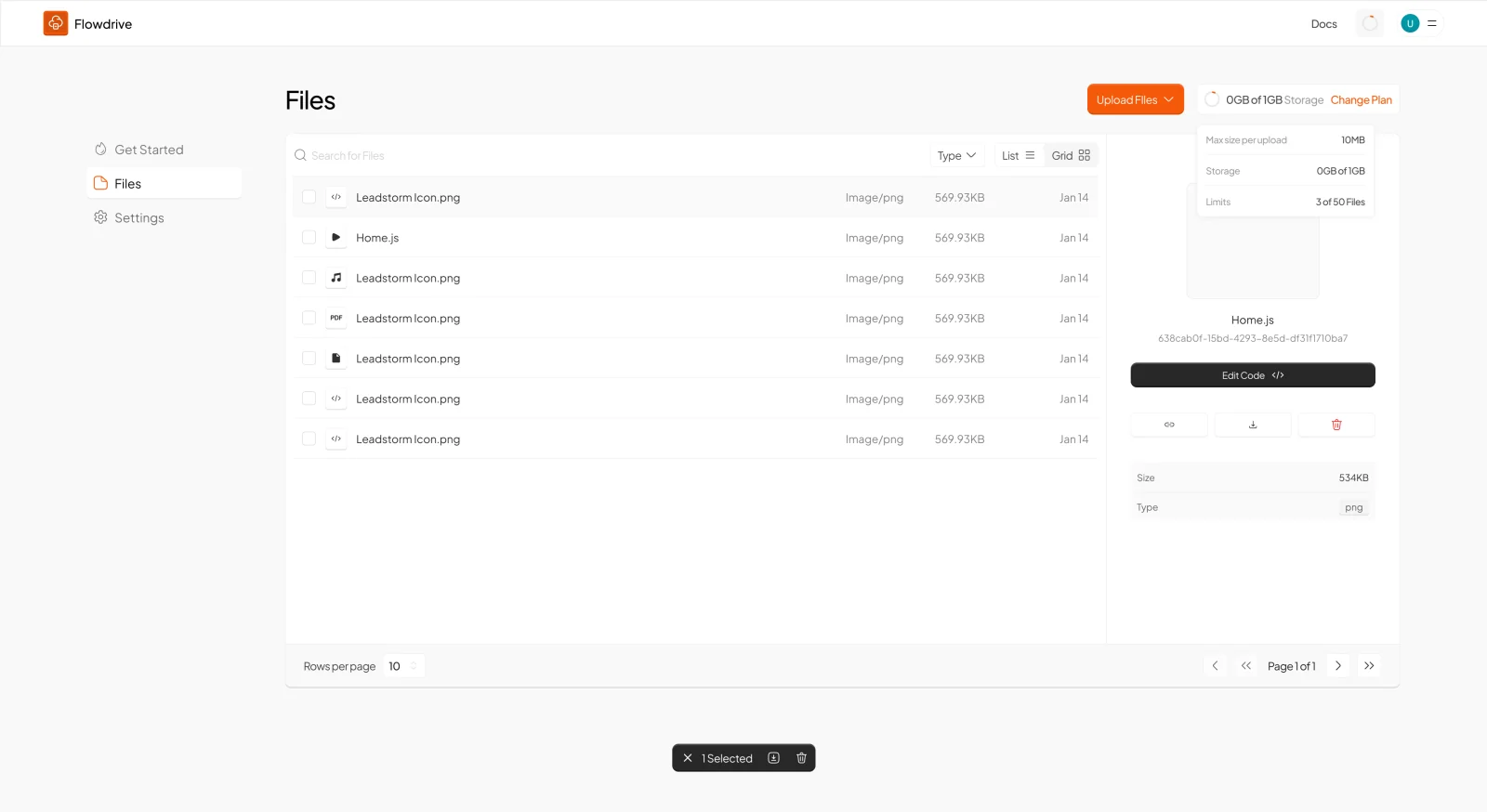
The framing was not the only thing that was off. Putting the first file screen beside the
current one shows the decision that took longest to see: in version one, the URL — the single
object the entire product exists to hand over — was an unlabelled icon.
Version one. The file's identity is a UUID, and the link is one of three unlabelled icons.
The detail panel leads with 638cab0f-15bd-4293-8e5d-df31f1710ba7 — an identifier no user needs.
“Edit Code” is the most prominent action, above the link. The secondary feature outranked the primary one.
Three nav items: Get Started, Files, Settings. No delivery concept exists yet.
Today. The URL has its own tab, named Deliver, and the delivery decision sits beside it.
Link Address is first, copyable, and shown as the address it will actually resolve to.
Custom Slug replaces the UUID, so the URL can carry a name a human chose.
Delivery Mode — direct or adaptive — is a decision made per file, at the point the URL is created.
The conceptual model in the next section is what I should have designed to from the start. I
arrived at it by watching people fail to find a copy button.
What I promised before I built it
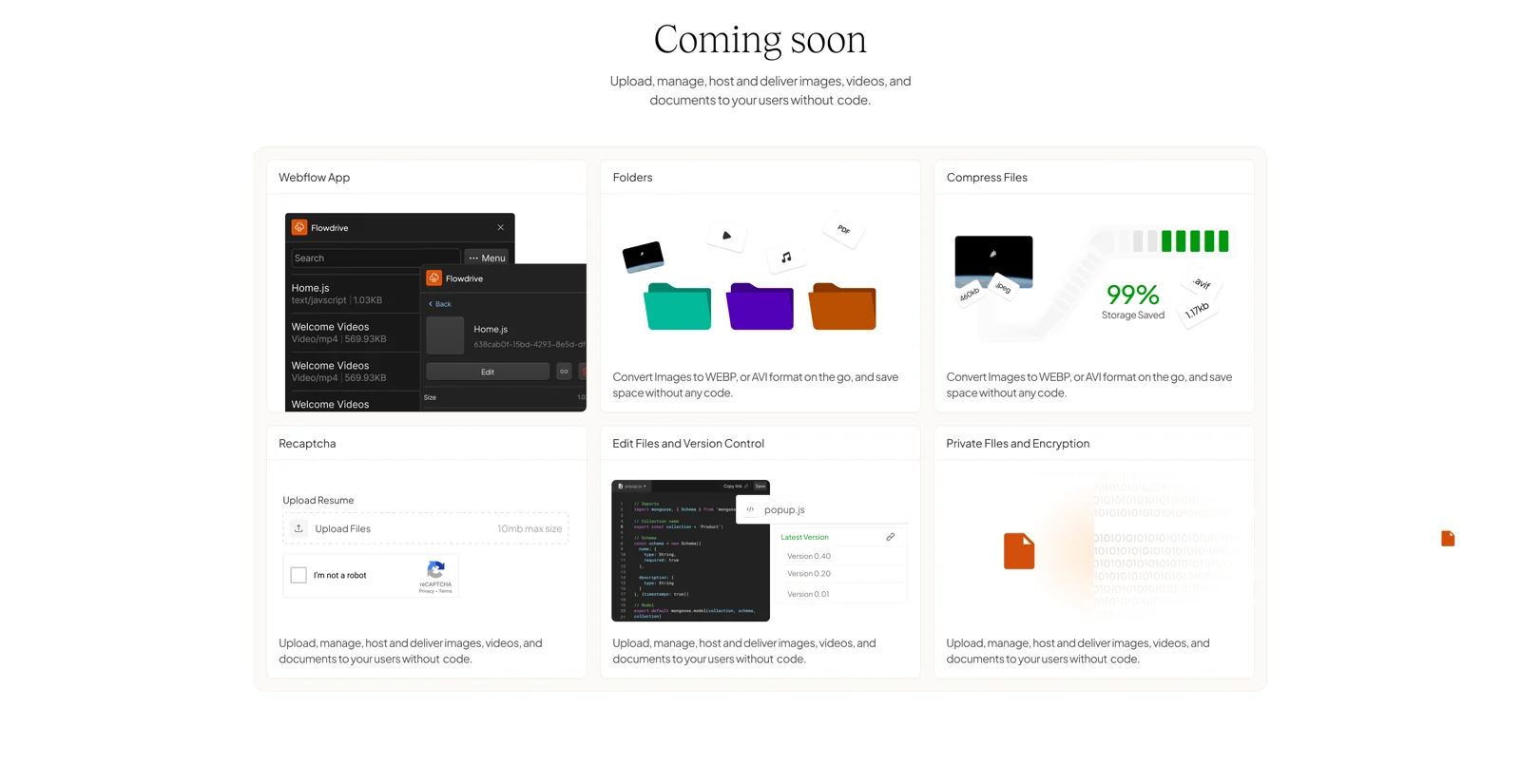
The first site published its backlog. Every card here came from a request rather than a plan — including file editing, which later turned Flowdrive into something I had not designed for.
“Edit Files and Version Control” was a promise made to customers who kept re-uploading changed CSV and JSON files.
“Recaptcha” exists because opening uploads to a client’s visitors immediately invited spam.
Publishing a backlog is a commitment device: it is much harder to quietly drop a card someone can see.
One more thing worth admitting, since the point of shipping in two weeks was to find out
whether anyone wanted this at all: the first version went live with duplicate placeholder copy
under all three feature columns, and a testimonial credited to “Definitely Someone :)”. It was not ready. It was live, which was the only
property that mattered that month.
Launch pricing, and the placeholder I shipped under it. Plans have since roughly doubled and the metric changed from storage to requests — the pricing decision further down explains why.
Conceptual model
Four objects, two of them new
Every decision below follows from one model. A Webflow user already understands elements and sites. Flowdrive introduces exactly two new objects — a file and the URL it resolves to — and the URL is where the
new part hands off to the part they already know.
The URL is the interface. Everything to its right behaves exactly like a file hosted anywhere else, which is why nothing downstream needs explaining.
01A file is uploaded. The only thing the user does inside my product.
02It resolves to a plain, direct URL — not a share page, not a preview, not a redirect.
03That URL goes into a Webflow element, or a field they already have.
04The site publishes. Webflow never knows the file is not its own.
Redrawn in September 2026 from the shipped product.
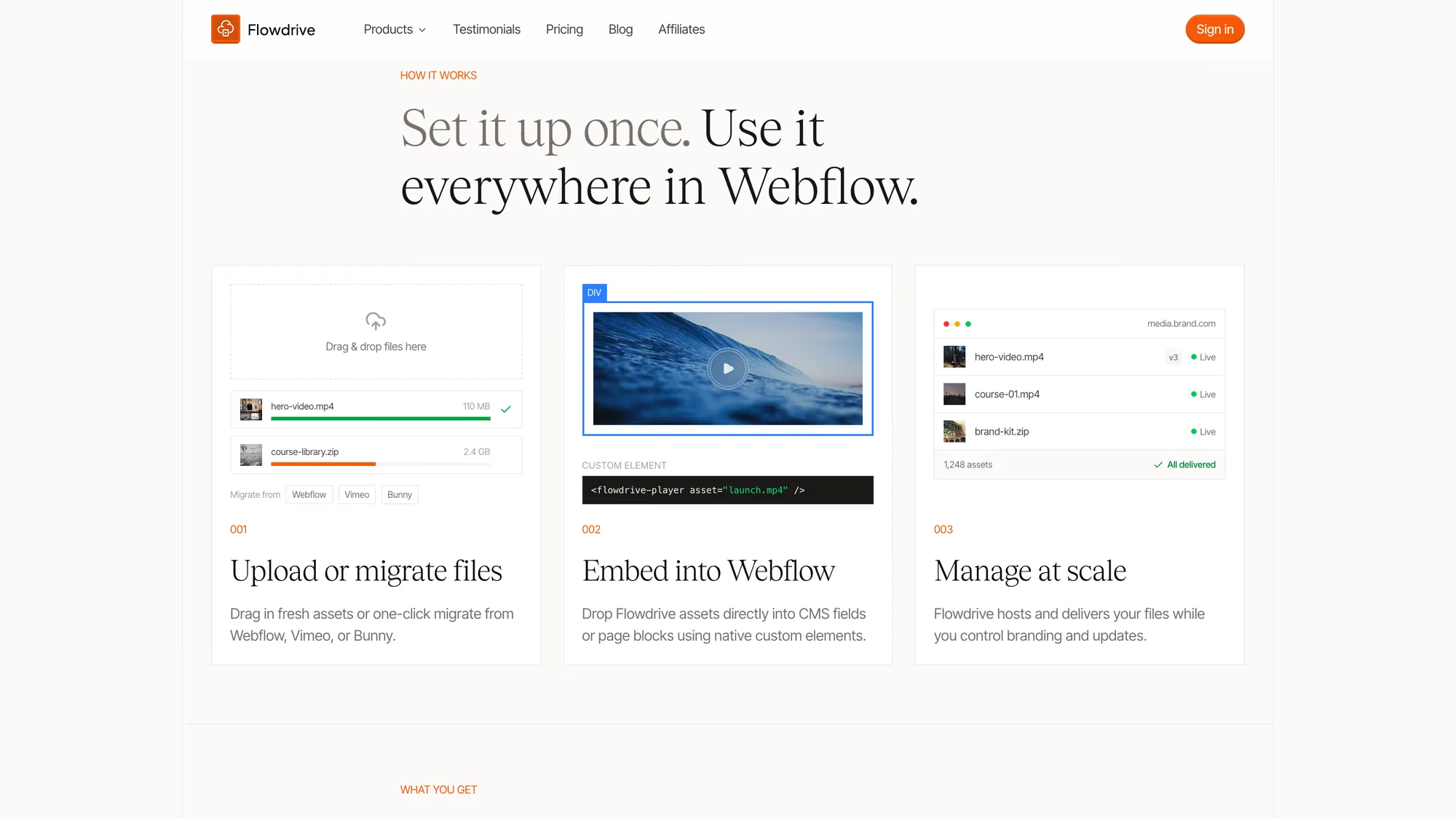
The same model as the diagram above, written for customers rather than for a portfolio. Three steps, in the order a person meets them.
Step 001 leads with migration, not upload — most new customers arrive with files already living somewhere else.
Step 002 is the handoff point: the URL entering a Webflow CMS field or a native custom element.
Step 003 is the reason people stay. Re-uploading to change a file is the thing every workaround gets wrong.
Decisions
Four calls that shaped the product
Each could have gone the other way, and each closed something off. The costs are listed
because a decision without a cost is a feature announcement.
01
The unit is a URL, not a share link
The problem
Every consumer file host optimises for sharing with a person: a preview page, permissions, a link that expands into an interface. Webflow needs the opposite — a string a browser can treat as the file itself.
Options on the table
Mirror Dropbox and Google Drive: folders, share sheets, permissioned links.
Make every file resolve to a plain, direct URL and ship no sharing model at all.
What I chose
Every file resolves to a direct URL, on the customer's own domain, exposed on the file itself. No share sheet, no preview page, no intermediate step.
Why
Getting a usable direct URL out of Dropbox takes several steps and Drive is worse — that friction is the thing people were working around. A plain URL behaves like any hosted file, so there is nothing to teach: it drops into an element, a CMS field or a stylesheet reference unchanged.
What it cost
No folder hierarchy and no permission model. Worse, it shipped with no role-based access at all — anyone invited to a workspace could see every file, read the code and change it. A real hole, which I named publicly rather than waiting to be asked.
“For Dropbox, if you want to find the URL you have to go through several processes just to get the URL.”
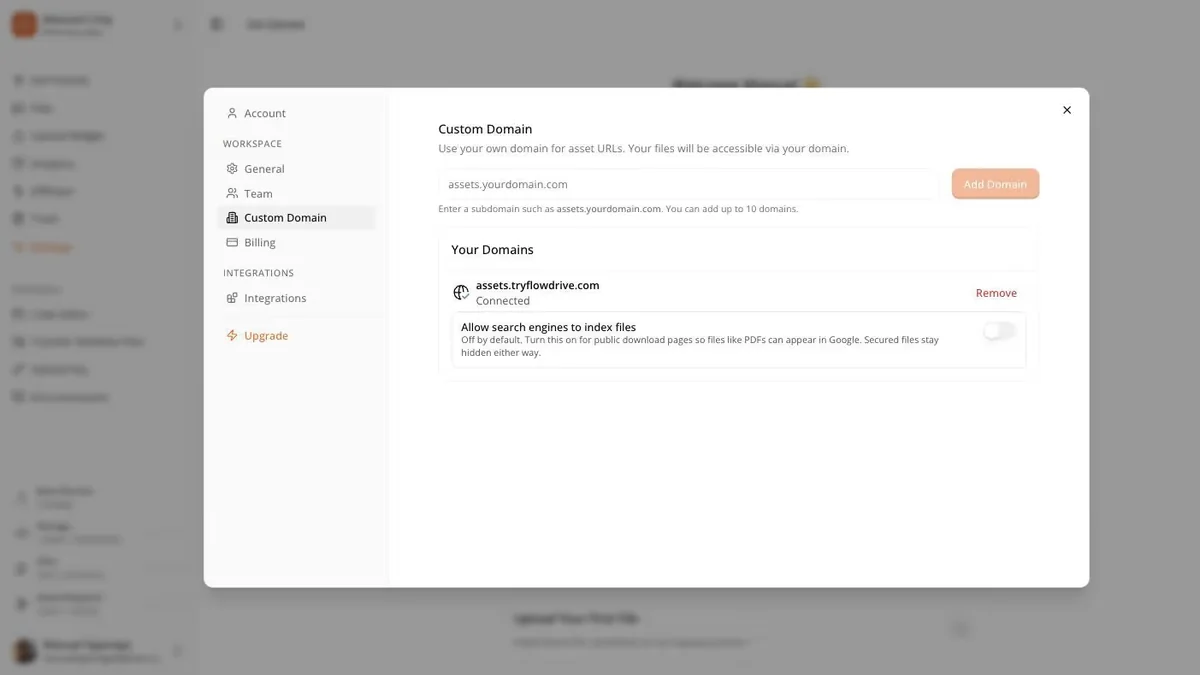
The decision, made concrete. Files are delivered from the customer's own domain, so nothing in their markup advertises that a third party is involved.
One field, one connected state. The complexity of certificate provisioning and DNS is deliberately absent from the interface.
Search-engine indexing is off by default, with the consequence spelled out — public download pages otherwise turn up in Google. A default I would rather explain than have someone discover.
02
Cloudflare R2, not AWS
The problem
The promise the research pointed at was hosting video without a bandwidth bill. Whether that promise could be made honestly was an infrastructure decision, not a marketing one.
Options on the table
AWS S3 plus CloudFront — the default, and metered on egress.
Cloudflare R2 — zero egress cost, one vendor, less mature tooling.
What I chose
Cloudflare R2, chosen before the pricing page was written.
Why
On AWS I would be billed for every byte delivered, which means metering customers on bandwidth, which means the product cannot promise unlimited delivery. R2 charges nothing for egress, so the promise is one I can stand behind — and it is what lets flat tiers survive a customer serving tens of millions of requests. The pricing, the positioning and the architecture are one decision, not three.
What it cost
Committed to a single vendor at the storage layer. It also constrains the self-hosted version I have explored: it has to be 'connect your own Cloudflare account', not 'run this anywhere', which narrows who that option can serve.
“If it was built on AWS, then I couldn't tell people they can host without bandwidth limits — because AWS charges based on bandwidth. Cloudflare bandwidth is basically zero.”
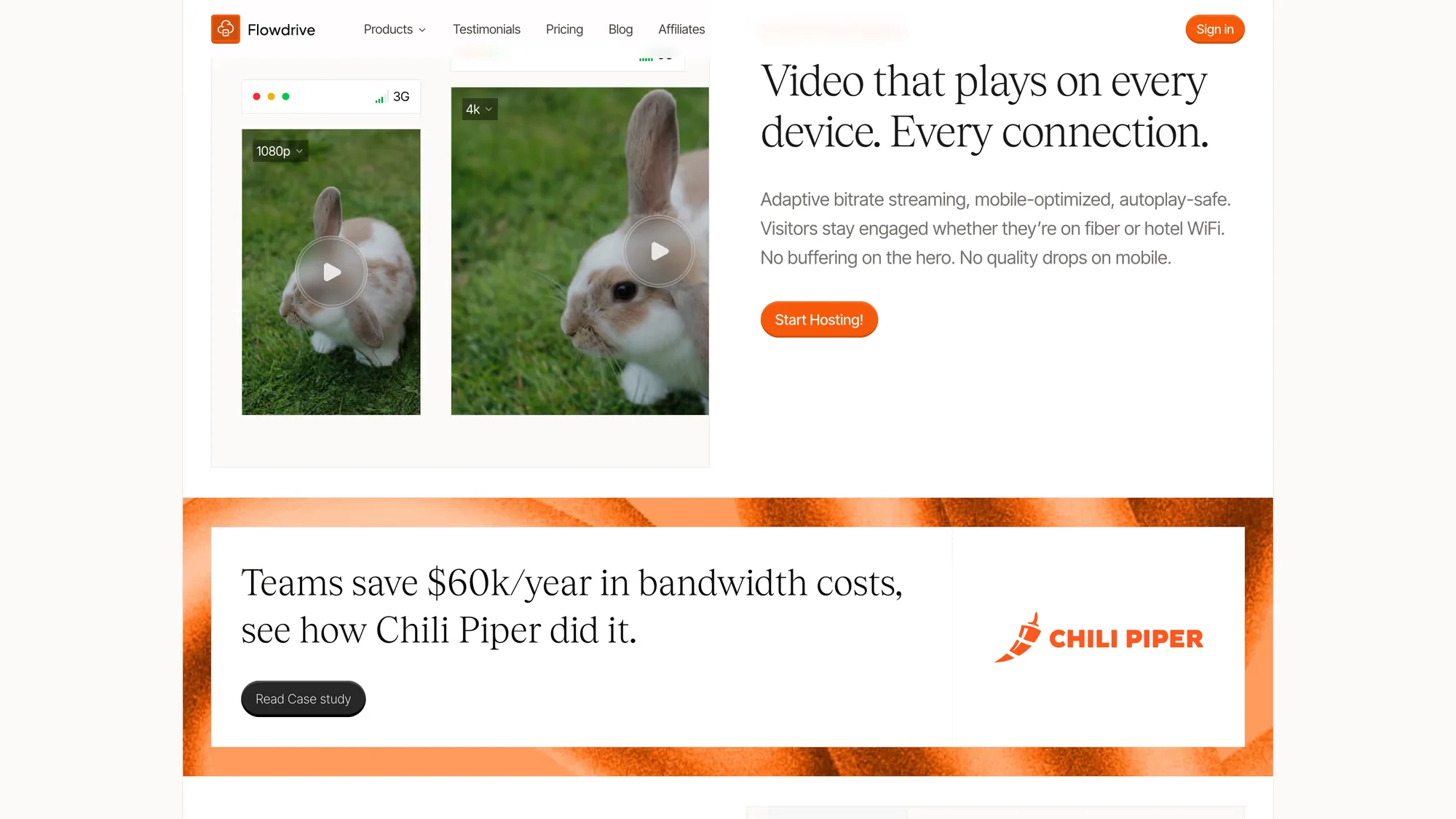
What the infrastructure decision buys the customer, stated as their outcome rather than my architecture. Nobody buys a bitrate ladder; they buy the video not stalling and the bill not arriving.
The comparison is 1080p against 3G, not codec specifications — the axis a visitor actually experiences.
The $60k figure is attributed to a named customer with a linked case study, because an unattributed savings number is worth nothing.
03
Bill by request, not by gigabyte
The problem
Bandwidth pricing punishes the customers doing best. A site whose video gets watched a lot produces a bill that scales with its own success, and no agency can quote a client a monthly figure they cannot predict.
Options on the table
Bill per gigabyte delivered, like every CDN — familiar, and unbounded.
Bill per unique request, where a visitor’s first access to a file in a month counts once and every replay is free.
What I chose
Unique requests. First access per visitor per month is one request; replays and repeat downloads cost nothing. Tiers are quoted in requests per month rather than storage or transfer.
Why
It makes the bill a function of audience size rather than of engagement, which is the number an agency can actually forecast and put in a proposal. It also aligns price with the value delivered — reaching a new person — instead of penalising the engagement everyone is trying to create.
What it cost
Nobody arrives understanding it. Gigabytes are intuitive and requests are not, so the model needed a whole explanatory section and an interactive calculator before it could be sold at all. That education cost is real, and it is the price of the pricing model.
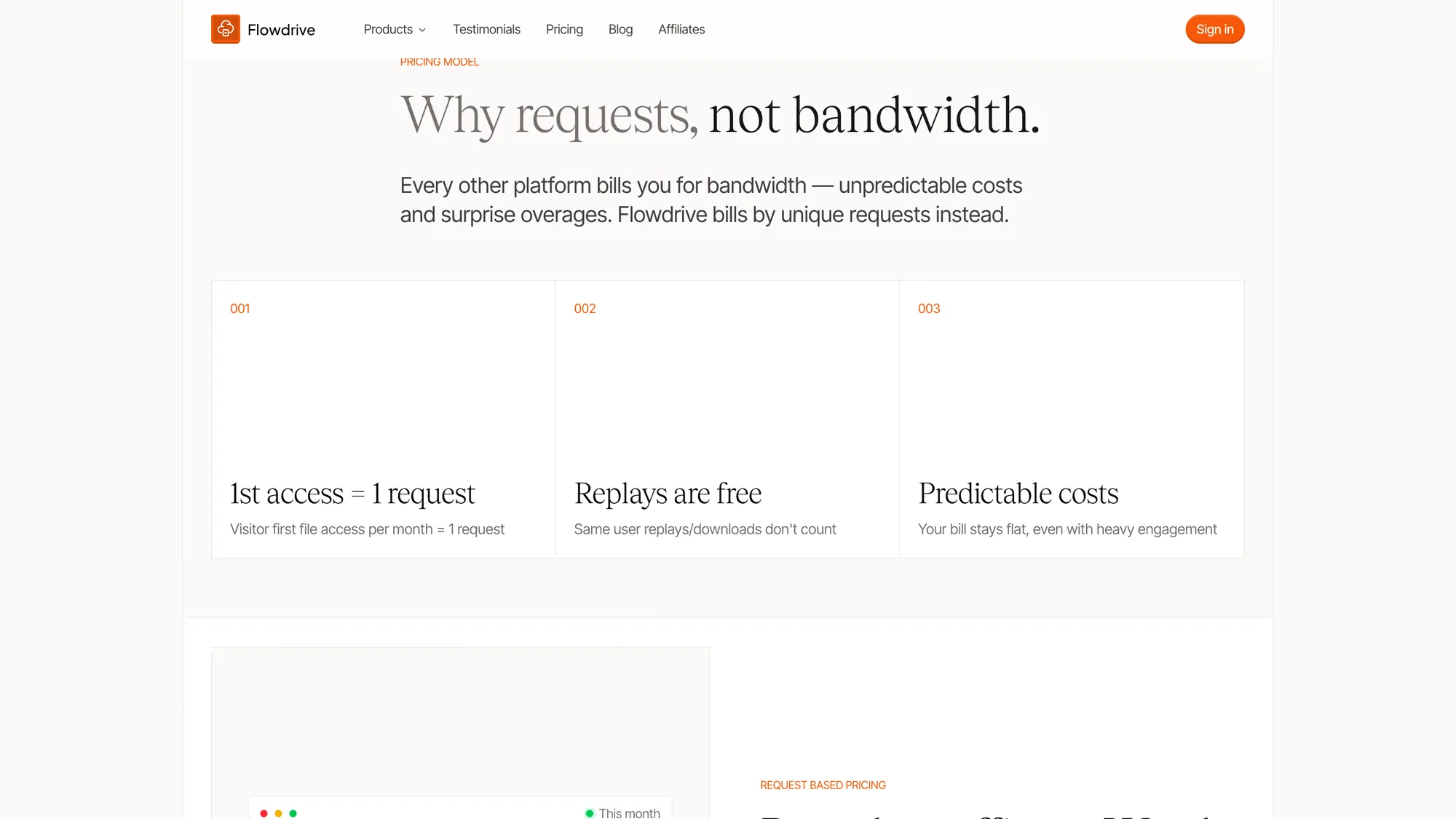
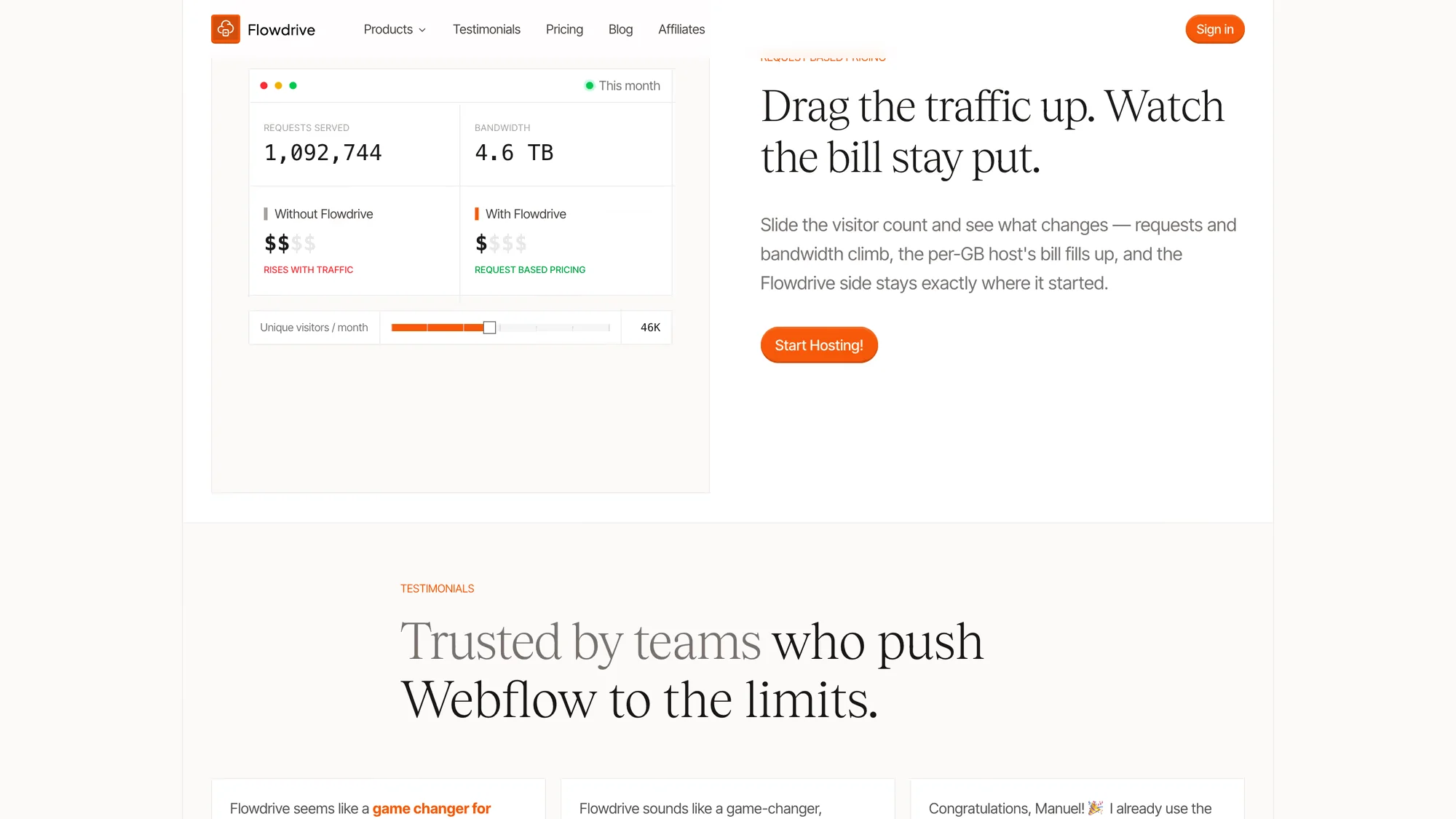
The explanation the model forced me to design. Three claims, in the order that answers the objections as they occur.
Reframed as a benefit — predictability — rather than as a billing mechanic.
“Replays are free” is the point that lands, because it is the one competitors cannot say.
Where I stopped explaining and let people test it. Drag the visitor count and the per-gigabyte bill climbs while the Flowdrive side does not move.
Built because the argument was not landing as prose. The interaction demonstrates the claim instead of asserting it.
The visitor slider is the input a customer already knows, so they can enter their own traffic and get their own answer.
04
Ship as a Webflow element, not an embed snippet
The problem
A URL solves hosting but not authoring. Webflow has no native audio or video element for a self-hosted file, so a user still has to hand-write markup inside an embed — exactly the work they hired Webflow to avoid.
Options on the table
Give people a copy-paste embed snippet and documentation.
Build real audio and video elements through Webflow custom elements, insertable from the Designer and bindable to CMS fields.
What I chose
Built the elements. A Flowdrive file is inserted as a component and configured in the Designer's own attribute panel — autoplay and muted included, after a user asked rather than setting them by hand.
Why
A Webflow user's mental model is 'add an element', not 'paste a script'. Matching it meant the feature needed no new concept and no documentation to get working, and the element binds to a CMS field like any other, so a collection of videos works without a workaround.
What it cost
Deeply unpleasant to build — nested sources inside elements, and a large amount of Webflow-API-shaped work that transfers nowhere else. It is also a hard dependency: if Webflow changes the custom element API, the nicest part of the product is the part that breaks.
The signal came from a professional Webflow developer who had already hand-built his own audio
element, and did not know these existed:
“This is one of the actual best use cases that I've seen of the custom element combined with a product. I've never seen someone… this is one of the best I've seen.”
One boundary I held deliberately: the Flowdrive script tag is required only for the
upload widget. Hosting and playback need nothing injected into the page — which is why moving
files to Flowdrive shows up as a Lighthouse improvement rather than a regression.
Interaction design
One feature, three levels of control
Upload was the original client request, and it had the hardest audience problem in the product:
the same feature has to serve someone who has never written JavaScript and someone wiring it
into existing Webflow form logic. Rather than build two features or pick a side, I made it a
ladder — each rung works alone, and you only climb if the rung below does not fit.
Progressive disclosure, driven entirely by HTML attributes. Nobody writes JavaScript to reach any rung, and each rung is a superset of the one above.
01fd-upload-default on a div — Flowdrive renders its own widget. Zero configuration, and the default for most users.
02fd-upload-custom — your own div becomes the trigger, so the widget matches the site while the upload behaviour stays ours.
03fd-input targeting an existing field — the URL is written into a Webflow input you already have, so Webflow form logic, validation and submissions keep working untouched.
Redrawn in September 2026 from the shipped attribute API.
The third rung is the one I am most pleased with. It resists the instinct to own the whole
form: by writing into a field the user already built, Flowdrive stays a component inside their
system rather than replacing it.
The configuration screen for that ladder. The first question it asks is which path you are on, because the answer changes everything shown afterwards.
Webflow and Script tag are the two entry paths, chosen first rather than presented together.
The notice at the top migrates users off a hand-pasted script they added themselves — the cost of having once shipped the snippet-based approach.
“Uploads are on — now add the widget” confirms state before instructions, so nobody debugs a widget that was never enabled.
What users changed
The product I did not plan
Three changes came from users rather than from me. The third column is the one worth reading —
shipping a request is not the end of the loop.
What users did or askedWhat I changedWhat it actually did
What users did or asked
Clients uploading CSV and JSON did not want to delete and re-upload a whole file to change one line.
What I changed
Added in-place file editing, built for data files.
What it actually did
Users immediately began hosting JavaScript, CSS and HTML instead — Webflow’s custom-code character limit was the other constraint they were fighting. Code hosting is now a meaningful share of usage, and I designed none of it.
What users did or asked
A user asked to set autoplay and muted while inserting a video, rather than adding them by hand afterwards.
What I changed
Exposed the attributes in the Designer at insert time.
What it actually did
Removed a step from a task people were already completing successfully. The best kind of small request, and the easiest to under-value.
What users did or asked
Free-tier users almost never crossed 50 files, while the accounts that converted had unpredictable delivery volume.
What I changed
Rebuilt both tiers around requests instead of file counts: free is now 5,000 requests a month, paid runs $19 to $129, up from $9 to $59 at launch.
What it actually did
The old metric measured storage, which nobody was short of. Requests measure what actually costs money and what customers actually need to forecast.
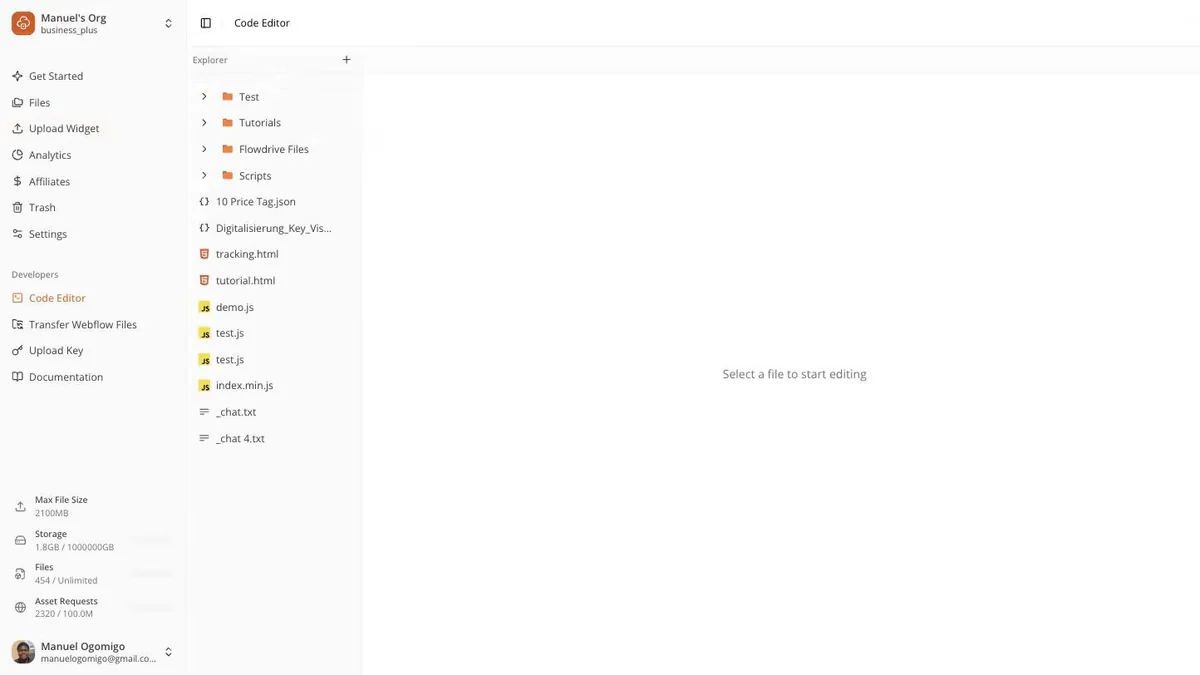
The unplanned product, visible in one screen. This tree was supposed to hold CSV and JSON. It holds tracking scripts, HTML pages, tutorials and demos.
tracking.html, demo.js, index.js, test.js — none of these are the data files the feature was built for.
The editor sits under a “Developers” heading in the navigation, added after the fact once it became clear who was actually using it.
A file host and a code host want different things from a file tree. This is still the file host’s tree, and it is the clearest piece of design debt in the product.
The hardest day
I deleted every customer asset
Flowdrive was working. Agencies and brands were on it and I had been talking to the Webflow
team. I was pushing an update and meant to clear my test assets. The configuration was
pointed at production. I pushed.
“Literally in like a split second, it just deleted everything.”
Backups existed but were not sufficient. I recovered some. Most were gone.
I told every user immediately — before they noticed, and before I knew how bad the recovery
would be. Then I built a path to replace an asset without re-uploading, so a URL already
embedded across a live site would keep resolving once the file was restored.
That fix helps someone with fifteen videos. It does little for someone with six hundred files.
And it helps nobody whose files arrived through the upload widget — those were
submitted by their end users, so they were never my customer's to re-upload. Recognising which
class of user a fix cannot reach was the most useful thing I did that week, and the least
satisfying.
Customers who had paid since day one cancelled the plan and the emails. For a week I got
messages daily asking whether they had done something wrong, each answered with: no, it was me.
“It's not even Flowdrive's problem, but rather mine — it is my problem, because I mistakenly cleared all assets.”
The proximate cause was a configuration flag. The real cause was upstream: I was rushing the
release because I believed I needed a shipped feature before I was allowed to market anything.
That habit put me in a hurry next to a destructive operation. Fixing the deploy process without
fixing the belief would have left the same accident waiting.
The flag was the proximate cause; the belief above it is what put me in a hurry next to a destructive operation. Both had to be fixed — the guards along the bottom are the ones that now exist.
01A belief that marketing required a shipped feature created pressure to release.
02The release was rushed, in a setup where test and production shared one configuration.
03A flag meant for test assets was pointed at production, and the deploy ran unconfirmed.
04Every asset was deleted in about a second, and I found it before any customer did.
05Now: a separate test environment breaks the chain early; three backups and a seven-day soft delete break it at the end.
Reconstruction of the incident described in Ep. 104, drawn September 2026.
The soft-delete window matters beyond my own accident: it means a customer’s own mistake
is survivable too.
In hindsight
What I would do differently
Role-based access in the first version. Shipping
collaboration where every invited person can delete everything was a decision by omission —
the kind a customer discovers instead of me.
Soft delete before scale, not after. Recoverability
is not a feature you add once you have something to lose. It is the cost of storing other
people's work at all.
Make destructive operations name their target. The
accident was possible because a flag could quietly point at production. A destructive action
should require typing the environment it affects — a design problem in my own tools I had
never treated as one.
Give the code editor its own model. It is still
wearing the file host's file tree. The people using it most are served worst by the interface
they were handed.
The first of those was asked of me in public, at launch, and I did not have a good answer:
“I'm curious about the security aspect — how does Flowdrive ensure that the uploaded files are kept secure? Also, are there any limitations on file sizes or types for the hosting?”
It is on the testimonials page rather than buried, because a question I could not answer is
more useful to me than another compliment — and because the access model it points at is still
the weakest part of the product.
Where it got to
Three years on
Flowdrive serves more than 70 million requests a month. It is live at tryflowdrive.com, on a free tier, if you would rather use it than read about it.
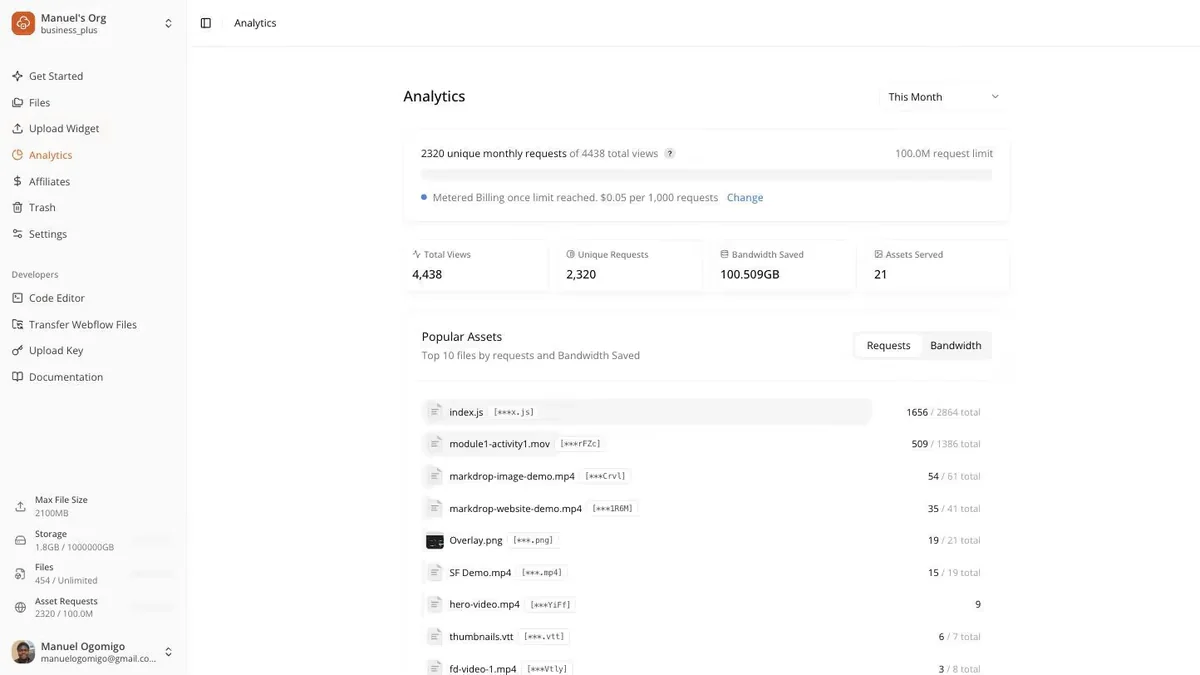
Analytics built around the customer's argument, not mine. Bandwidth saved is the number they take to whoever approves the subscription. The figures shown are a single workspace, not the platform.
Unique requests sit beside total views so the billing metric is always shown next to the intuitive one.
Popular assets are ranked by requests and bandwidth, which is how a customer finds the one file costing them money.
Metered billing appears inline once a plan limit is reached, rather than arriving as a surprise line on an invoice.
EU-primary delivery, added because European agencies were asking where bytes physically sit before they would sign. A sales objection that turned into an architecture requirement.
Next
The rest of the work
Markdrop, StudioDuo, StayNorth and Ben Bites — the other products and client engagements,
each with the role I held and what it changed.